This is default featured slide 1 title

Go to Blogger edit html and find these sentences.Now replace these sentences with your own descriptions.

This is default featured slide 2 title

Go to Blogger edit html and find these sentences.Now replace these sentences with your own descriptions.

This is default featured slide 3 title

Go to Blogger edit html and find these sentences.Now replace these sentences with your own descriptions.

This is default featured slide 4 title

Go to Blogger edit html and find these sentences.Now replace these sentences with your own descriptions.

This is default featured slide 5 title

Go to Blogger edit html and find these sentences.Now replace these sentences with your own descriptions.

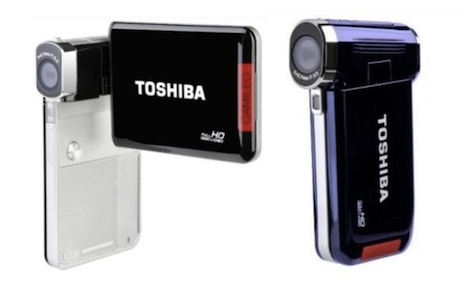
Toshiba Brings Mini HD Camcorder Stateside


As of mid-April, U.S. ED camcorder buyers can now purchase what most of the world already could with Toshiba's Camileo line of mini camcorders. Initially, Toshiba is releasing the 5MP S20 ($179.99), 10MP H30 ($249.99), and I OMP XI 00 ($399.99). All models include HDMI and USB 2.0 connections, but the S20 with its full 1080p resolution, 3-inch swiveling display, 4X digital zoom, maxi­mum 32GB storage (via SDfSDHC card), and YouTube upload button most resemble me size and scope of Cisco's mega-popular

Flip Video cameras. Speaking of which, Cisco recently added the Flip SlideHD ($279.99) to its stable complete with upright-sliding 3-inch touchscreen and headphone jack, borh firsts for the Flip series. The SlideHD stores four hours ofHD video but is a $50 increase over the Flip MinoHD and a $100 bump over the Ultra HD, both of which store two hours of ED video .

Stowaway Resurfaces In Time For Tablets

Back when PDAs ruled the mobile space, iGo's full-sized, foldable Stowaway Keyboard was the accessory for typists with a strong aversion to tiny keypads. 


Despite iGo discontinuing the Stowaway and selling its intellectual property years ago, it appears the portable keyboard is making a comeback in the form of the Foldable Mini USB Keyboard (about $53) via new owner Thanko. This time around, however, the board touts a USB connection, making it a natural fit for the bevy of tablets now following in the Apple i Pad's footsteps. Reportedly, the board weighs roughly 8 ounces, has a 19mm key pitch, supports Windows and Mac O'Ses, and folds down to 3.6 x 5.1 x 0.8 inches for traveling.

Auzentech X-Fi Forte 7,1


whether you're building the ultimate gaming machine or configuring the best movie-viewing setup, graphics capa­bility is likely at the forefront of your mind. But getting the most out of your media requires a sound card with the best in audio fidelity, and Auzentech's X- Fi Forte 7.1 is just that. The Forte 7.1 builds on Auzentech's previous sound card, the Prelude 7.1. The major difference between the two cards lies in the Forte's PCI-E interface, which offers a higher throughput than the Prelude's PCI interface. Like the Prelude, the new Forte sports Creative's X-Fi chipset, but receives a boost with updated circuitry and components, including EAX 5.0 support.


The Forte has a 120dB D/A converter, headphone amplifier, and microphone pre-amp. It also features 64MB of X-RAM. Other worthwhile specs to mention in­clude the IS-pin analog I/O rnulticablc

and replace­able OPAMPs (operational ampli- fiers) for the front left and right audio. Installation was a cinch. The card is shipped with a low-profile bracket-perfect for fitting into HTPCs. But we tested the Forte in a desktop computer, so we attached the standard bracket that is included in the package. To switch brackets, we had to

remove a single Philips head screw and two jack screws. It's worth men­tioning that you'll need a 3/16 nut driver for the jack screws, a tool that not everyone will have lying around .

We tested the Forte 7.1 using M- Audio's StudiophileAV 40 reference speaker system. We were quite impressed with the clarity and intensity of the sound. There was a significant difference from our system's onboard audio, and by tweaking the options in the included audio software, we were able to customize the audio. The software was easy to use, with Entertainment, Game, and Audio Creation modes. The Entertainment and Game modes were pretry intuitive, with a basic volume wheel and equalizers. The Audio Creation mode was much more involved and should be reserved for advanced (or meticulous) users, as there are far more options to configure, including dB levels for all speakers and auxiliary effects .

Sapphire Vapor-X Radeon HO 4870

t's evident from the box that the Sap­phire Radeon HD 4870's Vapor-X feature is a big deal. Vapor-Xis a newer feature from Sapphire that gives the Radeon HD 4870 superior cooling and quieter operation. Without delving into specifics, Vapor-X technology is similar to a heatpipe, using a hot, flat surface over which a liquid coolant is vaporized and then condensed, all within a small cham­ber mounted on the card. The Radeon HD 4870 is built on a custom PCB that adds Black Diamond chokes and

high-polymer capacitors, which make this card cooler, more power-efficient, and more reliable. The Vapor-X also has an HDMI output with 7.1 surround-sound support. Benchmark scores for the Radeon HD were relatively predictable for a card of its caliber. 3DMark Vantage ranked at P9936, while Crysis Warhead scored almost 10fps at 2,560 x 1,600 resolution. Far Cry 2 posted slightly lower than expected, with about 31fps at 1,920 x 1,080 and almost 23fps at the highest resolution. Overall, Sapphire's take on the Radeon 4870 is a winner, especially considering its re­duced price tag compared to other manufacturers who are charging as much or more for inferior specs .

Solid-State Showdown

Two RAM Leaders' SSDs Square Off


The solid-state storage market has really been heating up as oflate, with a con­stant influx of faster-and sometimes more affordable-drives, in addition to firmware updates that enhance the performance of existing products. For example, fierce memory rivals Corsair and ocz recently began offering new products designed to compete in a few performance categories with Intel's much-heralded X25-M, the Corsair P256 (model tested: CMFSSD­256GBG2D), and the ocz Vertex Series SATA II SSD (model tested: OCZSSD2- 1 VTX120G), respectively. The Corsair P256 and OCZ Vertex Series drives share some similarities, namely their 2.5-inch form factors, SATA 3Gbps interfaces, and Samsung MLC NAND flash memory chips that reside at the hearts of the drives. Setting up the drives was simple and straightforward. And neither exhibited any compatibility problems with Intel-, Nvidia-, or AMD-based southbridges on various Gigabyte- or Asus-built motherboards.

But each uses a different controller tech­nology to manage the data being sent to and retrieved from the drive, which results in drastically different performance, as you'll see in our benchmark results. As its name suggests, the Corsair P256 is a 256GB SSD. It features a sturdy, brushed aluminum shell, which encases a new Sam­sung S3C29RBB01-YK40 drive controller and double-stacked flash memory, as well as 64MB of onboard cache. The OCZ Vertex Series drives, which are available in capacities ranging from 30 to 250GB, also sport 64MB of cache and hard metal cas­ings, but the OCZ drives use Indilinx IDX110MOO-LC drive controllers.

access time. And although both drives blow past Intel's X2 5- M in terms of average se­quential write speeds, neither could come dose to the excellent X25-M in random writes, as is evident by the Intel drive's dominant performance in the IOMeter tests. Both Corsair and OCZ S drives' per­formance is a significant step up from tradi­tional hard drives.

One area where the Corsair P256 and OCZ Vertex Series 120GB drives (sort of) blow away Intel is price. The 256GB P256's $699 and the 120GB OCZ Vertex Series' $345 price tags are higher than Intel's $319 80GB X25-M. Those prices, however, equate to a $2.73 and a $2.87 cost per giga­byte for the Corsair and OCZ drives, re­spectively. The Intel X25-M commands a hefty $3.98 per gigabyte.


by Marco Chiappetta


Logisys Two Color (Blue/Red) Character-Illuminated Keyboard

The combination of the illuminat­ed keyboard and the hotkeys on the Logisys Two Color (Blue/Red) Character- Illuminated Keyboard (Model KB208BK) makes this an appealing keyboard for those looking to control music on a PC and pull all­nighters in a poorly lit office or dorm room. The slim, black design gives it a sophisticated look, and it has a palm rest with tall legs, which makes the key­board comfortable to use. The keys are arranged well, so my fin­gers didn't feel crowded as I typed, but the ENTER key is large, which affects the position of the keys around it. If you are used to the standard-sized ENTER key, this could take some adjusting. The soft-touch keys, however, were slightly sluggish and unresponsive, which meant it skipped a few letters keeping up with this speedy typist.

The hotkeys, which are lined up vertical­lyon both sides of the keyboard, add to the elegant look of the keyboard rather than detract from it. There are 15 hotkeys (which are a combination of multimedia and In­ternet hotkeys) and a dial that adjusts the brightness of the illumination. Don't be fooled by what you read on the Logisys Web site and keyboard packaging, though. The dial doesn't control the volume, as the Web site claims; the volume hotkeys control the volume. Also, the packaging indicates there are application hotkeys for sleep mode, your My Computer folder, and the Windows calculator, but those keys didn't exist on my keyboard. The red and blue illumination, howev­er, is just as bright as the pricier Logitech Illuminated keyboard (which has white backlighting). The PS2 and USB inter­face options, along with the other fea­tures, make the Two Color (Blue/Red) Character-Illuminated Keyboard a decent illuminated keyboard for its price .

Asus N 1 OJC-A 1

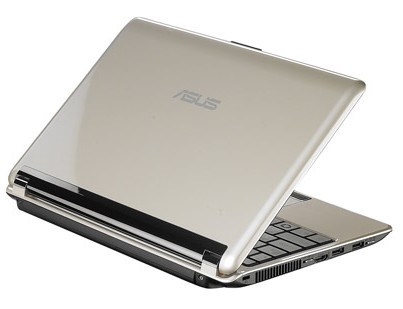
we don't care if you call it a net­book or a notebook. The Asus NIO, with a IO.2-inch screen (800 x 480), 1.46-inch maximum thickness, and 3.I-pound weight, is a slick ultra-portable with a sweet surprise. Yes, like other net­books, this one uses the I.6GHz Intel Atom Processor N270 paired with the Intel 945GSE chipset. This means that the Intel GMA 950 graphics engine is built in. However, flip a little switch on the left edge before booting, and you can boot using discrete Nvidia GeForce 9300M GS graphics. You pick Intel for battery life and Nvidia for performance. How big is the performance difference? Potentially huge. With CUDA-enabled apps, some tasks that would normally bring this nctbook's Atom N270 to its knees (say you want to transcode your media files with Nero Move or watch something encoded in H.264) will be considerably better, thanks to the 9300M GS. At the end of the day, though, this is a platform for basic 2D and 3D entertain­ment; the Atom N270 remains a perfor­mance bottleneck.

Our unit shipped an 8-in-I card read­er, I.3MP Web cam, HDMI port, Ex­press Card slot, and fingerprint reader built into the touchpad. You'll have to load apps from an external USB or LAN source, be­cause there's no built-in optical drive.

Honestly, the NI 0 was a little heavier and thicker than we would've liked. The screen bezel feels excessively thick, but we're guessing this is a concession made by opting for a 1 0.2-inch screen along with a comfortably broad keyboard. Still, we reviews I hardware found the screen very decent for prolonged viewing, including for video playback. We love the button above the keyboard for tog­gling between different power/performance profiles. In High Performance mode with Wi-Fi enabled and all power-saving fea­tures disabled, we achieved a battery run­time of 4 hours and 54 minutes-nice. The NIO is convenient, affordable, and effective for nongaming tasks. We hope this sparks a trend in pushing the enve­lope for nctbook expectations .